Multi-Media-Server Support (Plex / Emby / Jellyfin)
The tool can drive any number of Plex, Emby, and Jellyfin servers from a single instance. A new file is processed exactly once (one FFmpeg pass on the GPU) and the resulting frames are published to every configured server that owns it, in the format that server expects.
Note
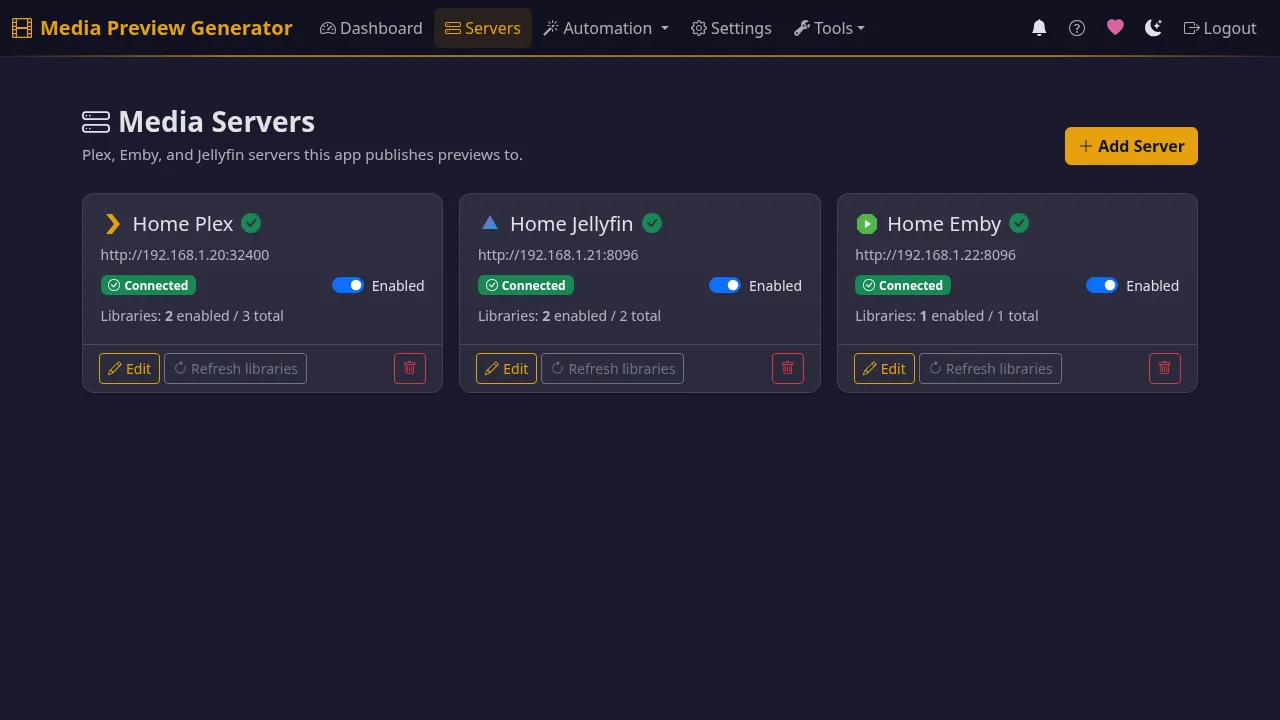
The universal webhook URL is configured on the Automation page (top nav, between Servers and Settings) under Webhooks — not on the Servers page. The per-server Plex Direct webhook lives under Servers → edit your Plex server → Webhook & Scanner.
This page covers:
- Why this exists
- How a webhook fires through the system
- Adding a server
- Per-vendor output formats
- Webhook configuration per vendor
- Library ownership and retry semantics
- Smart dedup: skipping work that's already done
- Slow-backoff retry queue
- Previews Readiness — the unified "is everything set up right?" panel
- BIF Viewer (multi-server)
- Plex multi-server auto-discovery
- REST API summary
Why this exists
Two reasons:
- Built-in generation has gaps.
- Plex documents no GPU option for preview thumbnails.
- Emby's Video Preview Thumbnail task is software-only (forum) — no GPU option.
- Jellyfin can use hardware decoding for trickplay, but it's off by default, and by default the job runs at below-normal priority with one thread, inside the server process. (A historical issue with the legacy Intel i965 VAAPI driver on older Intel CPUs caused slowness for some users — that's been resolved upstream.)
- Multi-server users do redundant work. If you run more than one server (a surprisingly common setup), each one generates its own previews from the same source files. This tool processes each file once and publishes the result everywhere — Plex BIF bundle, Emby sidecar BIF, Jellyfin trickplay tiles — from a single FFmpeg pass.
Where this tool helps most: offloading preview generation onto a separate machine (a NAS, a dedicated GPU box, anything) so your media server's CPU and GPU stay free for playback.
How a webhook fires through the system
A single inbound URL, POST /api/webhooks/incoming, handles every source.
                  ┌────────────────────────────────────────────────────┐
  Plex multipart ─►                                                    │
  Emby JSON     ──►  classify_payload  ──►  match server by Server.uuid│
  Jellyfin JSON ──►   (vendor sniff)         / Server.Id / ServerId    │
  Sonarr/Radarr ──►                                                    │
  {"path": ...} ──►                                                    │
                  └────────────────────────────────────────────────────┘
                                               │
                                               ▼
                       resolve_item_to_remote_path  →  apply path_mappings
                                               │              ▼
                                               ▼      canonical local path
                                  process_canonical_path
                                               │
                                               ▼
                                  registry.find_owning_servers
                                               │
                                               ▼
                                 ONE FFmpeg pass → frame dir
                                               │
                       ┌───────────────────────┼───────────────────────┐
                       ▼                       ▼                       ▼
            Plex bundle BIF         Emby sidecar BIF        Jellyfin trickplay
            +scan trigger           +Library/Media/Updated  +Items/{id}/Refresh
Failures on one server don't take down the others — if Jellyfin's write fails the Emby sidecar still lands. The job log shows a per-server status row so you can see exactly what happened.
Note
Two terms used throughout the rest of this doc:
- Dispatcher — the routing engine inside the app that decides which servers a file goes to and in what order.
- Publisher — the per-vendor writer that produces the on-disk output (Plex BIF, Emby BIF sidecar, Jellyfin trickplay tiles).
Adding a server
Three vendors, three slightly different UX paths. All three terminate at
POST /api/servers with an auth token already in hand.
Plex
Use the existing Setup Wizard at /setup. Plex OAuth via plex.tv
issues a token; nothing changes from the single-Plex flow. The migration
to media_servers[] happens automatically when the server first boots
the new code (the legacy plex_* keys are auto-translated by schema
migration).
Emby
1. POST /api/servers/auth/emby/password
   { "url": "http://emby:8096", "username": "admin", "password": "..." }
   → returns { "access_token": "...", "user_id": "...", "server_id": "..." }

2. POST /api/servers
   { "type": "emby",
     "name": "Office Emby",
     "url": "http://emby:8096",
     "auth": {
       "method": "password",
       "access_token": "...",
       "user_id": "..."
     }
   }
   → returns the persisted entry with auth redacted; id is generated
API-key paste is also supported — skip step 1 and put {"method": "api_key", "api_key": "..."} straight into the auth block.
Jellyfin (Quick Connect — recommended)
Quick Connect lets the user authorise this tool from inside their Jellyfin web UI without ever giving us a password. Note: Quick Connect must be enabled by the Jellyfin admin under Server → Quick Connect; it's off by default.
1. POST /api/servers/auth/jellyfin/quick-connect/initiate
   { "url": "http://jellyfin:8096" }
   → returns { "code": "ABC123", "secret": "..." }

2. Display "code" to the user. They open Jellyfin → click their profile →
   Quick Connect → enter the code.

3. Poll until approved:
   POST /api/servers/auth/jellyfin/quick-connect/poll
   { "url": "http://jellyfin:8096", "secret": "..." }
   → { "authenticated": false }   (still pending)
   → { "authenticated": true }    (approved!)

4. Exchange the secret for a token:
   POST /api/servers/auth/jellyfin/quick-connect/exchange
   { "url": "http://jellyfin:8096", "secret": "..." }
   → { "access_token": "...", "user_id": "...", ... }

5. POST /api/servers with auth.method = "quick_connect" and the token.
Jellyfin (username + password fallback)
Same shape as Emby — POST /api/servers/auth/jellyfin/password.
Per-vendor output formats
Each server type expects a different on-disk layout. The app picks the right format automatically based on the server's type — you don't need to configure this.
| Vendor | Adapter | Output path |
|---|---|---|
| Plex | plex_bundle |
Inside Plex's config folder: Media/localhost/{hash}/.../index-sd.bif |
| Emby | emby_sidecar |
Next to the media file: {basename}-{width}-{interval}.bif |
| Jellyfin | jellyfin_trickplay |
Next to the media file: {basename}.trickplay/{width} - 10x10/{0,1,…}.jpg (folders of 10×10 tile sheets). Optionally off the media drive — see below. |
Because Emby and default-layout Jellyfin write next to the media file, this container needs the media mounted read-write for them. A :ro mount makes each write fail with "Read-only file system". Plex only writes into its config folder, so :ro media is fine there. See Volume Mounts.
Why Jellyfin's format is different. Jellyfin (10.9 onwards) reads its own native JPG tile-grid format — not BIF. BIF would require users to install a third-party plugin (Jellyscrub) on their Jellyfin server. This app writes the native format, so no extra plugin is needed.
Optional: store Jellyfin trickplay off the media drive. By default the app writes tiles next to each video. If you'd rather keep the media drive clean (like Plex), turn on Store trickplay off the media drive on the Jellyfin server card. The app then writes into Jellyfin's data folder (<config>/data/trickplay/<id[:2]>/<id>/{width} - 10x10/) instead. This needs, all together: the Media Preview Bridge plugin installed, Jellyfin's config dir bind-mounted read-write into this container (set the path in the server's Jellyfin config folder field), and SaveTrickplayWithMedia off for the libraries. The Setup Health tab guides every step and flags anything missing. Flipping this on doesn't move tiles already written next to the media — they stay until cleaned up by the usual orphan sweep or removed manually. See previews readiness → off-media.
Required Jellyfin library settings. Three per-library settings need to be set so Jellyfin reads the trickplay folders this app writes — most importantly Save trickplay images to media folders = on. The Servers page in this app has a one-click "Disable on this server" button that flips all three correctly. See the in-app help for what each setting does.
Optional Jellyfin plugin (recommended). Installing the Media Preview Bridge plugin (one-click install from the Servers page) makes trickplay register instantly the moment this app finishes writing the tiles. Without the plugin, keep Jellyfin's Extract trickplay images during library scan on: Jellyfin then picks the tiles up on its next library scan. With that flag off and no plugin, new tiles wait for Jellyfin's daily trickplay task (3 AM by default). See Jellyfin Plugin for details.
To install the plugin by hand instead, add this repository URL in Jellyfin → Dashboard → Plugins → Repositories, then install Media Preview Bridge from the Catalogue and restart Jellyfin. Updates then arrive through Jellyfin's normal plugin updates.
Webhook configuration per vendor
Set the same URL — https://<this-tool>/api/webhooks/incoming?token=<webhook_secret>
— in every vendor's webhook UI. The token query parameter is required for
Plex (Plex's webhook UI offers no header support); other vendors can use
the X-Auth-Token header instead.
The router auto-detects the vendor by payload shape and matches the source
server by the identifier embedded in every vendor's payload (Plex's
Server.uuid, Emby's Server.Id, Jellyfin's ServerId).
| Vendor | Webhook source |
|---|---|
| Plex | Server settings → Webhooks → Add webhook (Plex Pass required for outbound webhooks) |
| Emby | Server settings → Notifications → Webhooks (Emby Premiere required) |
| Jellyfin | Install jellyfin-plugin-webhook, configure under Plugins → Webhook |
| Sonarr / Radarr | Settings → Connect → +Webhook |
For Jellyfin, the plugin's stock ItemAdded template carries ItemId /
ItemType / ServerId but not the file path. The router calls back
to Jellyfin's API once to translate the id to a path. If you want to
skip that callback, configure the plugin's template body to be:
That bypasses the auto-detection altogether and treats the payload as a path-first webhook.
Per-server fallback URL
If two servers share a server identifier (rare; usually only happens
with cloned VMs) auto-detection can't disambiguate. Use the explicit
per-server URL: POST /api/webhooks/server/<server_id>.
Library ownership and retry semantics
The dispatcher distinguishes three cases when a webhook fires:
| Case | Response |
|---|---|
| 1. Path is under no enabled library on this server | Skip permanently (status no_owners) |
| 2. Path is under an enabled library, but the server hasn't scanned the file yet | Slow-backoff retry queue (status skipped_not_indexed) |
| 3. Server is unreachable | Tight transport retry, eventual failure |
Ownership is decided from the cached libraries[] snapshot in each
server config — no per-file index. Toggle a library off via the
per-library enabled flag and the dispatcher will skip files in
that library cleanly with no retry storm.
Smart dedup: skipping work that's already done
Two layers prevent the same file being processed twice:
-
Short-term frame cache — when a second webhook arrives for the same file shortly after the first (e.g. Sonarr and Plex both notify within minutes), the second one reuses the already-extracted JPGs instead of running FFmpeg again. The cache holds the most recent files for a configurable window (default 1 hour). Concurrent webhooks for the same file (a "webhook storm") collapse into a single FFmpeg pass.
-
Long-term sidecar tracking — every published output gets a small companion file (
<file>.bif.meta) that records the source file's last-modified time and size. On any later webhook, the app checks this companion file first — if every output already exists and the source hasn't changed, the whole pipeline is skipped. This handles "Sonarr fires immediately, then Plex's own webhook fires 30 minutes later for the same file."
When the source file does change (a Sonarr quality upgrade swaps the file in place), the size/mtime comparison fails and FFmpeg re-runs automatically. To force regeneration manually (e.g. you changed the thumbnail quality), tick Regenerate when starting a job — that bypasses both layers.
Outputs created before this dedup system shipped don't have the sidecar — those get treated as fresh on the first post-upgrade webhook (no regeneration storm), then stamped on the next publish.
Slow-backoff retry queue
When a publisher returns SKIPPED_NOT_INDEXED (most commonly Plex,
because publishing needs the bundle hash from /library/metadata/{id}/tree
which only exists after Plex has scanned the file), the dispatcher
schedules a retry instead of waiting for the user to fire a manual
re-run.
The same retry also covers files no server knows yet, stale paths, and Emby/Jellyfin publishes still waiting for the server to register the item.
Backoff schedule: the wait before each retry is 1 m → 2 m → 5 m → 15 m → 60 m. Two settings under Settings → Retry policy shape it:
- Retry count (default 3, max 10) sets how many retries run. With the default, that's 1 m → 2 m → 5 m, then it stops (about 8 minutes in total). Set it to 5 for the full ~83-minute schedule. Retries after the fifth wait 60 m each.
- Initial retry delay (default 30) scales the whole schedule by value ÷ 30. The default leaves it unchanged, and 60 doubles every wait. Values of 15 or less all halve it (30 s → 1 m → 2.5 m …).
One job per attempt: each retry runs as its own "Retry: …" job that covers only the files still pending, not the whole original batch.
Reuses the dedup machinery: retries call back into the same dispatch code path, so the journal short-circuit, frame cache, and per-publisher skip-if-exists all apply on retry. Retries are cheap when the publish has already succeeded through some other path (e.g. Plex's own webhook firing after its scan completes).
Previews Readiness — the unified "is everything set up right?" panel
Each server has its own settings that can quietly break previews — a Jellyfin flag off that silently deletes published tiles, a Plex FSEvent toggle that stops the library noticing new files, a plugin the Media Preview Bridge needs to register results instantly, a Plex config mount that's accidentally read-only. Previews Readiness is the single place the UI surfaces — and fixes — all of them.
How to open it
- Go to Servers in the top nav.
- Each server card shows a coloured glyph next to its name when the audit finds issues (❗ = critical, ⚠ = recommended). Click the glyph.
- The Edit Server modal opens directly on the Setup Health tab — every check grouped by section (Server status → Library settings → Advanced), each with an ⓘ explanation, a direct link to the detailed doc, and Enable/Disable toggles where they apply.
Destructive toggles. A handful of flips are data-destructive — the most
important one is Jellyfin's EnableTrickplayImageExtraction. Turning it off
makes Jellyfin delete every tile this app has written on the next library
refresh. The UI requires you to type disable trickplay to confirm.
Per-check reference: full list of every audit with "what it checks / why it matters / how to fix" lives in the Previews Readiness guide.
Scripting it. For the underlying REST surface
(GET /api/servers/{id}/previews-readiness,
POST /api/servers/{id}/health-check/apply,
POST /api/servers/{id}/install-plugin), see
Reference — Multi-Media-Server Endpoints.
BIF Viewer (multi-server)
The BIF Viewer at /bif-viewer lets you visually inspect a published
preview to see exactly what a player would render. It works for all
three vendors:
- Plex / Emby: parses the BIF file directly via
bif_reader, renders frames as JPEG via/api/bif/frame?path=…&index=…. - Jellyfin: parses the trickplay manifest, slices individual
thumbnails out of the tile-grid sheets via Pillow, serves them via
/api/bif/trickplay/frame?server_id=…&sheets_dir=…&index=…&tile_width=10&tile_height=10.
Use the server-picker dropdown at the top of the page to switch between configured servers; the search results, frame list, and thumbnail grid all refresh per server.
Multi-server search endpoint:
Returns up to 15 results:{title, type, year, media_file,
preview_path, preview_kind, preview_exists}. preview_kind is
"bif" (Plex/Emby) or "trickplay" (Jellyfin) — the viewer branches
to the right renderer based on this.
Plex multi-server auto-discovery
After Plex OAuth completes (one PIN sign-in via plex.tv), the wizard
calls /api/v2/resources and lists every server the account can
access. Tick multiple servers in the discovered list to add them
all in one go — each gets its own media_servers[] entry with the
same shared OAuth token but a distinct server_identity (Plex's
clientIdentifier) so the webhook router can disambiguate them.
The single-pick path still works for users who want to customise one server before adding (set the config folder, adjust libraries). Tick exactly one server to populate the wizard fields; tick multiple to batch-add with shared defaults (you can edit each one from the Servers page afterwards).
This reverses the older "single Plex only" limitation tracked in issue #215.
REST API summary
| Method | Endpoint | Description |
|---|---|---|
| GET | /api/servers |
List all configured servers (auth redacted) |
| POST | /api/servers |
Add a new server |
| GET | /api/servers/<id> |
Get one server (auth redacted) |
| PUT/PATCH | /api/servers/<id> |
Update fields (redacted auth values are kept) |
| DELETE | /api/servers/<id> |
Remove a server |
| POST | /api/servers/test-connection |
Test a candidate config without saving |
| POST | /api/servers/<id>/refresh-libraries |
Re-fetch the server's library list |
| GET | /api/servers/owners?path=... |
Diagnose which servers own a given path |
| GET | /api/servers/<id>/output-status?path=...&item_id=... |
Whether publisher output files exist for a path on this server |
| POST | /api/servers/auth/emby/password |
Username+password → Emby token |
| POST | /api/servers/auth/jellyfin/password |
Username+password → Jellyfin token |
| POST | /api/servers/auth/jellyfin/quick-connect/initiate |
Start Quick Connect ceremony |
| POST | /api/servers/auth/jellyfin/quick-connect/poll |
Poll for approval |
| POST | /api/servers/auth/jellyfin/quick-connect/exchange |
Exchange approved secret for token |
| GET | /api/servers/<id>/health-check |
Per-server settings audit (all vendors) |
| POST | /api/servers/<id>/health-check/apply |
One-click fix of mis-set settings (all vendors) |
| GET | /api/bif/servers/<id>/search?q=... |
Multi-server BIF Viewer search; returns preview_kind per result |
| GET | /api/bif/trickplay/info?server_id=...&path=... |
Parse a Jellyfin trickplay manifest + sheet metadata |
| GET | /api/bif/trickplay/frame?server_id=...&sheets_dir=...&index=N&tile_width=10&tile_height=10 |
Slice and serve a single thumbnail from a tile sheet |
| POST | /api/webhooks/incoming |
Universal webhook with vendor auto-detection |
| POST | /api/webhooks/server/<id> |
Per-server fallback webhook URL |
All endpoints (except /api/webhooks/* which use the webhook secret) accept
the same X-Auth-Token / Authorization: Bearer headers as the rest of
the REST API.